
How Does IPTV Work? Technology Explained
Understanding how IPTV works helps you optimize your setup, troubleshoot issues, and make informed decisions about services and equipment. This guide explains the technology, protocols, and infrastructure behind internet television streaming.
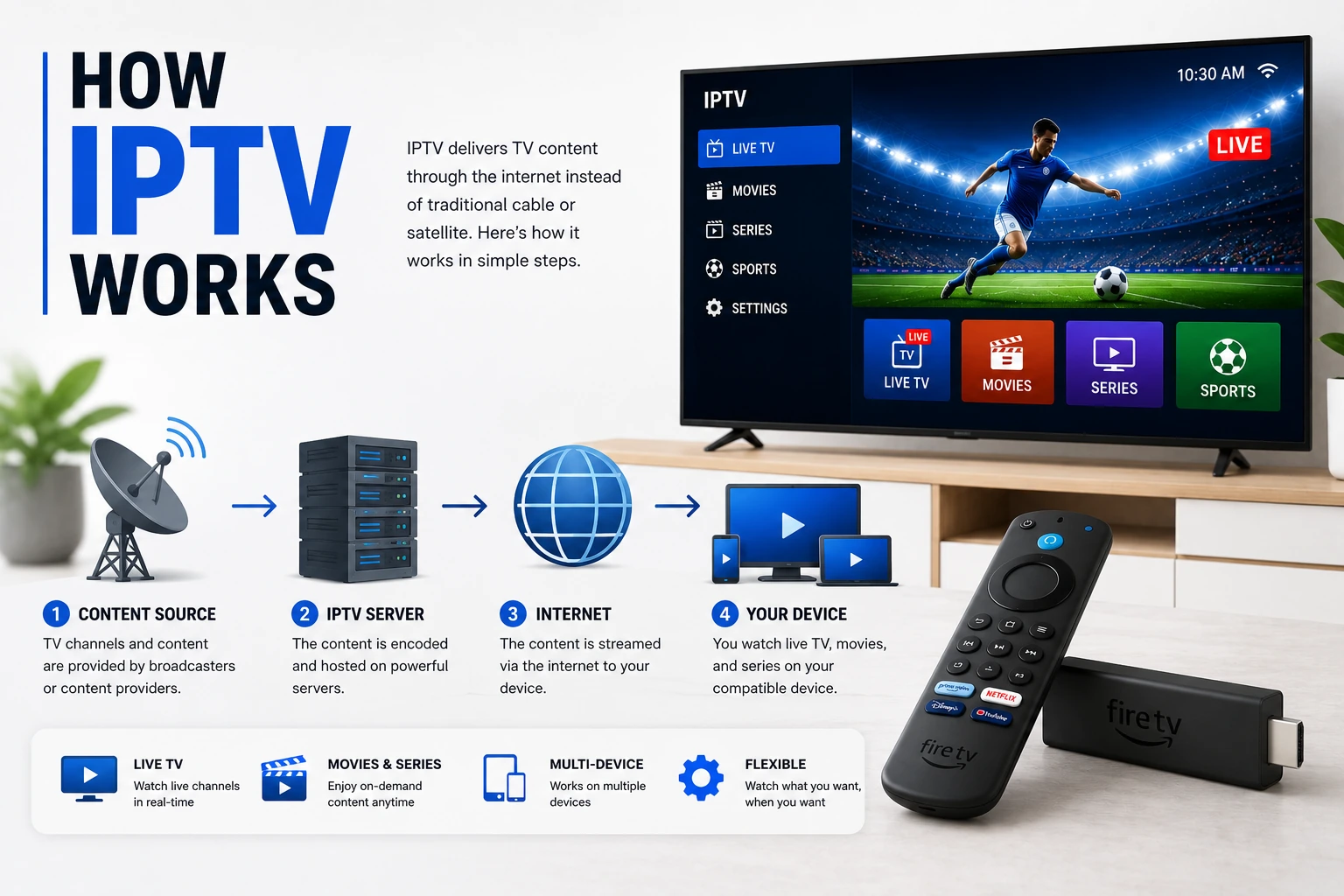
info Quick Overview
IPTV (Internet Protocol Television) delivers TV content over internet networks instead of traditional cable or satellite. Content is converted to digital data packets, transmitted via IP protocols, and decoded by your device. Unlike downloading, IPTV streams content in real-time, allowing you to watch without waiting for complete file downloads.
The IPTV Delivery Process
1. Content Acquisition
IPTV providers acquire content from broadcasters, studios, or create their own. Live TV signals are captured from satellite feeds, terrestrial broadcasts, or direct studio connections.
- � Live broadcasts captured in real-time
- � VOD content stored on servers
- � Multiple quality versions prepared
- � Content rights and licensing managed
2. Encoding & Compression
Raw video is encoded into digital format and compressed to reduce file size while maintaining quality. Modern codecs like H.264 and H.265 (HEVC) provide excellent compression.
- � H.264/AVC: Most common, wide compatibility
- � H.265/HEVC: Better compression, 4K support
- � Multiple bitrates created (adaptive streaming)
- � Audio encoded separately (AAC, MP3, AC3)
3. Content Storage
Encoded content is stored on servers and distributed across Content Delivery Networks (CDNs) for efficient global delivery.
- � Origin servers store master content
- � CDN edge servers cache popular content
- � Geographic distribution reduces latency
- � Redundancy ensures reliability
4. Transmission
Content is transmitted over IP networks using streaming protocols. Data is broken into packets and sent to your device.
- � Packets sent via TCP or UDP protocols
- � Adaptive bitrate adjusts to connection speed
- � Buffering minimizes playback interruptions
- � Error correction handles packet loss
5. Decoding & Playback
Your IPTV player receives packets, decodes the video/audio, and displays it on your screen in real-time.
- � Player buffers incoming data
- � Video/audio decoded by hardware or software
- � Synchronized playback of video and audio
- � EPG displays program information
IPTV Streaming Protocols
HLS (HTTP Live Streaming)
Most popular protocol for modern IPTV. Developed by Apple, HLS breaks content into small chunks and delivers them via HTTP.
Advantages:
- � Works through firewalls
- � Adaptive bitrate streaming
- � Wide device compatibility
- � CDN-friendly
Disadvantages:
- � Higher latency (10-30 seconds)
- � More server resources needed
RTSP (Real-Time Streaming Protocol)
Older protocol designed for real-time streaming. Often used with RTP (Real-time Transport Protocol) for actual data delivery.
Advantages:
- � Lower latency
- � Better for live broadcasts
- � Efficient bandwidth usage
Disadvantages:
- � Firewall issues
- � Less compatible with CDNs
- � Declining support
RTMP (Real-Time Messaging Protocol)
Originally developed by Adobe for Flash. Still used for live streaming ingestion but being phased out for delivery.
Advantages:
- � Low latency
- � Stable connection
- � Good for live streaming
Disadvantages:
- � Requires Flash (deprecated)
- � Limited modern support
- � Being replaced by HLS
MPEG-DASH
International standard for adaptive bitrate streaming. Similar to HLS but codec-agnostic and more flexible.
Advantages:
- � Open standard
- � Codec flexibility
- � Adaptive streaming
Disadvantages:
- � Less widespread than HLS
- � More complex implementation
Three Types of IPTV Delivery
Live TV
Real-time broadcasting of TV channels as they air. Similar to traditional TV but delivered over IP.
- � Simultaneous viewing
- � Channel surfing
- � EPG integration
- � Minimal delay (seconds)
Video on Demand
Pre-recorded content available for streaming anytime. Like Netflix but within IPTV interface.
- � Watch anytime
- � Pause/rewind/fast-forward
- � Content library
- � No scheduling needed
Time-Shifted TV
Catch-up TV that lets you watch recently aired programs. Combines live TV with on-demand flexibility.
- � Catch-up services
- � Start-over TV
- � Cloud DVR
- � Limited time window
Network & Bandwidth Requirements
| Quality | Resolution | Bitrate | Required Speed |
|---|---|---|---|
| SD | 480p | 1-3 Mbps | 3-5 Mbps |
| HD | 720p | 3-5 Mbps | 5-10 Mbps |
| Full HD | 1080p | 5-8 Mbps | 10-20 Mbps |
| 4K UHD | 2160p | 15-25 Mbps | 25-50 Mbps |
Important: These speeds are per stream. If multiple devices stream simultaneously, multiply the requirement by the number of streams. Add 20-30% overhead for network fluctuations.
Key Technical Components
Middleware
Software layer that manages user authentication, content delivery, billing, and EPG. Acts as the bridge between content servers and end users.
CDN (Content Delivery Network)
Distributed network of servers that cache and deliver content from locations closest to users, reducing latency and improving performance.
EPG (Electronic Program Guide)
Database containing TV schedule information, channel logos, program descriptions, and metadata. Updated regularly to show current and upcoming programs.
DRM (Digital Rights Management)
Security technology that protects content from unauthorized copying and distribution. Common systems include Widevine, PlayReady, and FairPlay.
Transcoding
Process of converting video from one format/bitrate to another. Enables adaptive streaming by creating multiple quality versions of the same content.
Frequently Asked Questions
How does IPTV work?
IPTV works by converting TV signals into data packets and transmitting them over the internet using IP protocols. Content is stored on servers, encoded into digital format, and streamed to your device on-demand or in real-time using protocols like HLS, RTSP, or RTMP.
What protocols does IPTV use?
IPTV uses several streaming protocols including HLS (HTTP Live Streaming), RTSP (Real-Time Streaming Protocol), RTMP (Real-Time Messaging Protocol), and MPEG-DASH. HLS is the most common for modern IPTV services due to its reliability and adaptive bitrate capabilities.
What is the difference between IPTV and regular streaming?
IPTV delivers live TV channels and scheduled programming over IP networks, while regular streaming (like Netflix) provides on-demand content. IPTV mimics traditional TV with channel lineups and EPG, whereas streaming services offer content libraries.
What internet speed do I need for IPTV?
For SD quality, you need at least 3-5 Mbps. HD streaming requires 5-10 Mbps, Full HD needs 10-20 Mbps, and 4K IPTV requires 25-50 Mbps. These are per-stream requirements, so multiple simultaneous streams need proportionally more bandwidth.
How is IPTV content delivered?
IPTV content is delivered through three main methods: Video on Demand (VOD) for pre-recorded content, Time-Shifted TV for catch-up services, and Live TV for real-time broadcasts. Content is encoded, stored on servers, and streamed using CDNs for efficient delivery.
link Related Guides
What is IPTV?
Complete beginner's guide to IPTV technology and benefits

M3U vs Xtream Codes
Compare IPTV delivery formats and protocols
Optimize IPTV Streaming
Improve streaming quality and eliminate buffering
Best IPTV Services
How to evaluate providers and avoid bad ones